Honeypot Chronicles: Analyzing 500k+ SSH Attacks and Hitting the OOM Wall
I’ve been running a Cowrie SSH honeypot on a Linode instance for about a month now. It started as a small experiment to see what kind of automated noise hits a fresh cloud IP, but it quickly escalated into a massive data-gathering exercise that eventually taught me more about log management and Linux resource limits than actual exploit techniques.
Deployment & Setup
The environment was built on a standard 1GB RAM Linode instance running a Cowrie honeypot within a Docker container. To maximize the “attack surface,” I mapped the host’s port 22 to the container’s internal port 2222. My actual administrative SSH access was moved to port 2222 on the host to avoid interference.
Data Volume & Attack Metrics
The sheer volume of traffic captured was staggering. In just 30 days of operation, the honeypot logged 575,238 attack events originating from 2,660 unique malicious IPs.
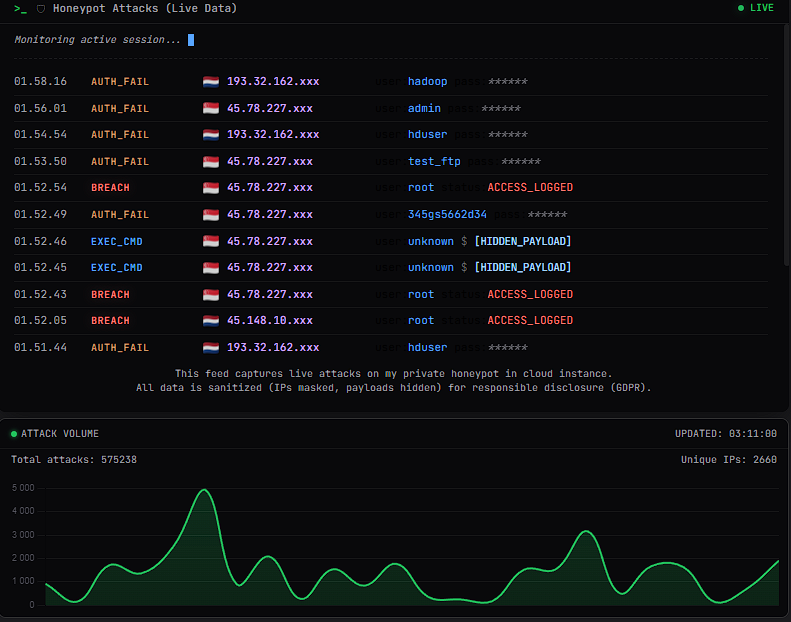 Figure 1: The custom dashboard visualizing the massive attack volume and session trends.
Behavioral Analysis: Raw Log Evidence
Beyond the high-level metrics, the raw JSON logs provided deep insight into automated exploitation patterns. Three distinct types of activity stood out:
1. Botnet Verification (The Arithmetic Test) Many bots used basic mathematical commands to verify that the shell was interactive and capable of execution.
1
{"eventid":"cowrie.command.input","input":"echo $((50+49))","message":"CMD: echo $((50+49))","src_ip":"14.225.xx.xx","session":"0af5d9de2a1c"}
2. Resource Fingerprinting Attackers frequently ran reconnaissance commands to profile the hardware and operating system.
1
2
{"eventid":"cowrie.command.input","input":"cat /proc/cpuinfo | grep name | wc -l","src_ip":"45.78.xx.xx"}
{"eventid":"cowrie.command.input","input":"uname -s -v -n -r -m","src_ip":"41.90.xx.xx"}
3. Persistence & Privilege Escalation A more sophisticated attacker attempted to modify filesystem attributes on the .ssh directory to bypass existing security and maintain persistence.
1
{"eventid":"cowrie.command.input","input":"cd ~; chattr -ia .ssh; lockr -ia .ssh","src_ip":"45.78.xx.xx"}
System Failure: The OOM Killer Event
The project eventually hit a hard limit when the cowrie.json log file exceeded 380MB. My custom Python visualization script was designed to load the entire log file into memory for processing. On a 1GB RAM instance, this created a massive resource bottleneck.
The Linux kernel eventually intervened, as captured in the emergency LISH console:
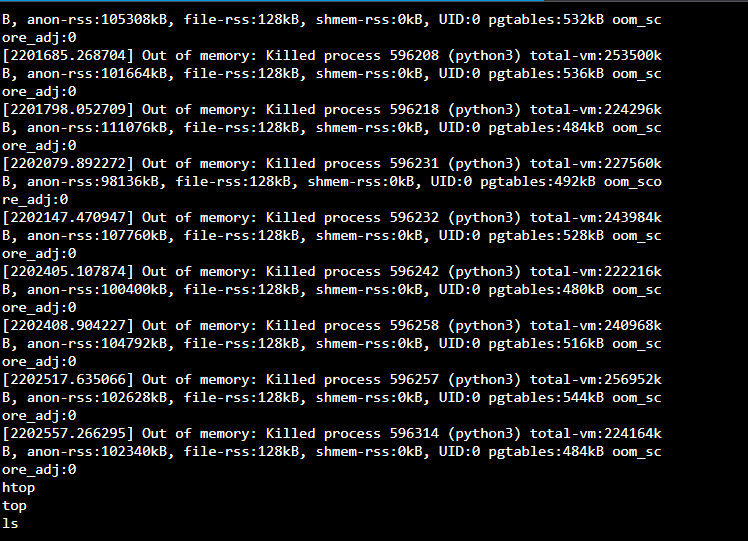 Figure 2: Emergency console output showing the Out of Memory (OOM) killer terminating the Python dashboard backend.
Root Cause & V2.0 Strategy
This failure was an invaluable lesson in “success-induced” denial of service. The architecture failed not because of the attacks, but because of inefficient data handling.
For the next iteration, the strategy is:
Streaming Data Processing: Replacing full-file reads with line-by-line processing or tail -f to keep the RAM footprint minimal.
Database Integration: Moving away from flat JSON files to an indexed database like SQLite for faster, more efficient querying.
Aggressive Log Rotation: Ensuring that no single log file exceeds 50MB before being archived.
The experiment was a definitive success in terms of data collection and a necessary lesson in operational security and resource management. Time to rebuild a more resilient system.