SIEM Environment: Wazuh & Suricata
Project Report: Auto-Defense Lab
>> MISSION: To design and deploy an automated defense system (IPS) capable of detecting and neutralizing active threats in a mixed OS environment. The goal was to move beyond passive log monitoring to real-time remediation.
- 🔹 Performance Engineering: Learned that default configurations fail under stress. Troubleshooting the "Agent Buffer Flood" was a critical lesson in resource management.
- 🔹 Purple Teaming: Acting as both the Attacker (Kali VM /Hydra) and Defender (Wazuh) provided a complete view of the cyber kill chain.
- 🔹 Infrastructure as Code: Gained deep understanding of modifying Wazuh XML configurations and Windows Agent policies.
The following infrastructure was deployed for the project to simulate a realistic attack scenario:
graph TD
    classDef attacker fill:#f87171,stroke:#333,stroke-width:2px,color:#000;
    classDef victim fill:#60a5fa,stroke:#333,stroke-width:2px,color:#000;
    classDef siem fill:#22c55e,stroke:#333,stroke-width:2px,color:#000;

    A[Kali Linux
Attacker]:::attacker
    B[Windows 10
Agent + Firewall]:::victim
    C[Wazuh Server
Manager + Analysis]:::siem

    A -->|1. RDP Brute Force| B
    B -->|2. Fwd Security Logs| C
    C -->|3. Alert: Rule 60204| C
    C -->|4. Active Response Cmd| B
    B -->|5. Drop Connection| A
| Machine | Role | Function |
|---|---|---|
| Linux VM | Wazuh Manager | Central SIEM server for log correlation & analysis |
| Windows 10 | Endpoint | Victim machine (Agent + Suricata) |
| Kali Linux | Threat Actor | Red Team operations (Hydra, Nmap) |
The Obstacle: Before deploying security rules, I conducted stress tests using Nmap. The initial results showed a critical bottleneck: the Wazuh Agent's internal buffer flooded immediately, causing log data to be dropped.
"Agent event queue is flooded. Check the agent configuration."

The Solution: I analyzed the ossec.log and modified the agent configuration. I increased the client_buffer queue size to 100,000 events. This adjustment allowed the system to withstand massive bursts of traffic without losing a single packet.
To move from Detection to Prevention, I configured the Wazuh Manager backend. I edited the XML configuration to trigger an Active Response script when specific criteria are met.
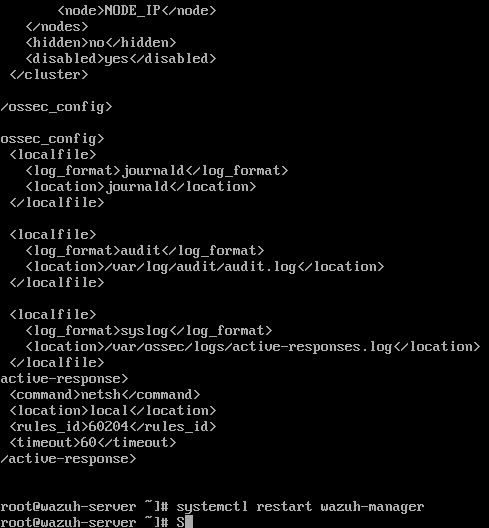
I linked Rule ID 60204 (Brute Force Detection) to the netsh command, instructing the Windows agent to block the attacker's IP for 60 seconds.
Using Kali Linux, I launched a dictionary attack against the Windows RDP port (3389) using Hydra.
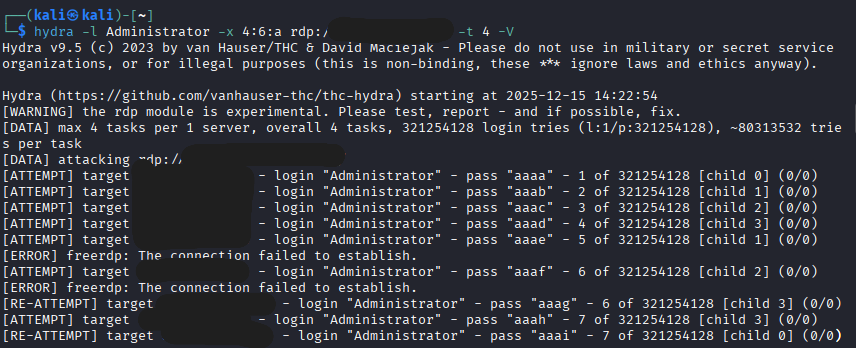
$ hydra -l Administrator -x 4:6:a rdp://TARGET_IP -t 4 -VWazuh SIEM ingested the Windows Security logs in real-time. The correlation engine successfully identified the pattern of multiple failed logins and triggered a high-severity alert.
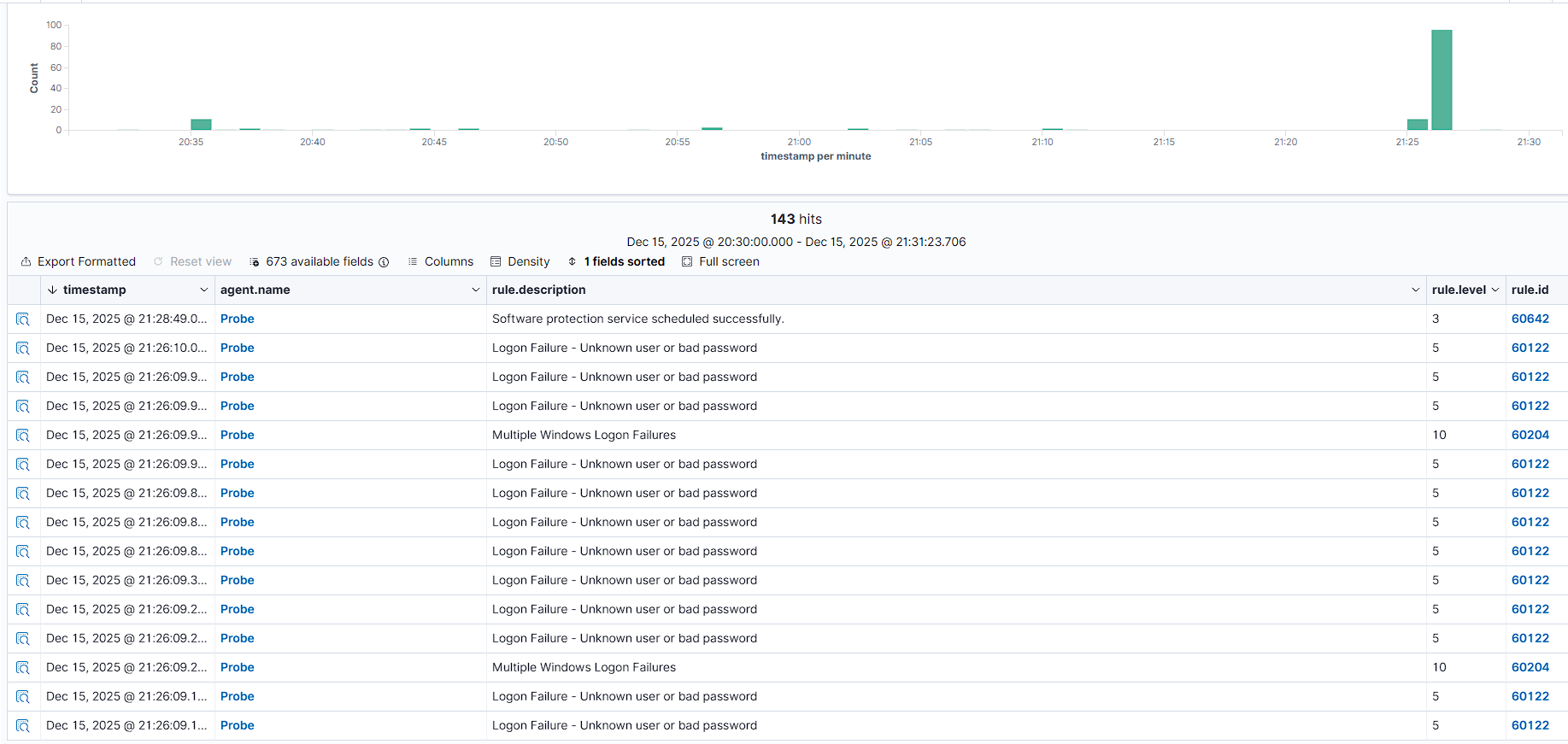
Rule ID 60204: Multiple Windows Logon Failures (Severity 10)
The Climax: The system reacted automatically without human intervention. Within milliseconds of the detection, Wazuh executed the firewall block.
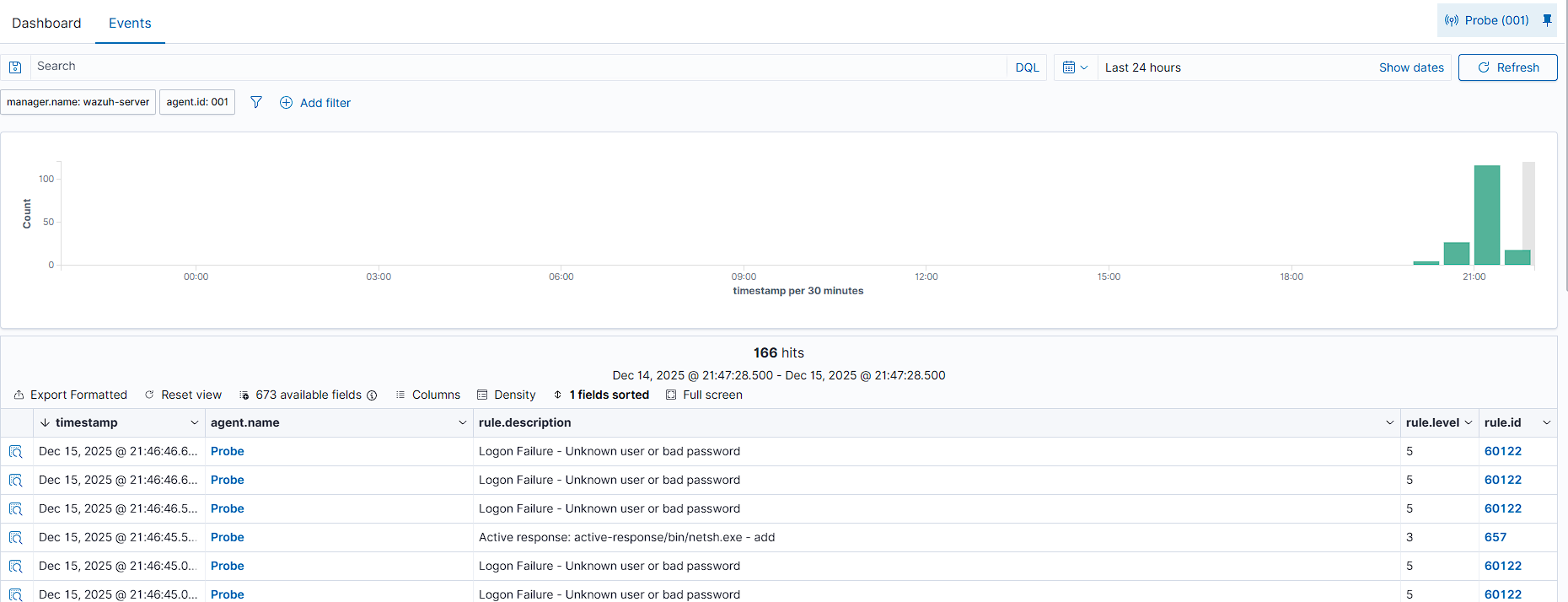
The log shows active-response/bin/netsh.exe - add. The attacker's connection was immediately dropped.
To prevent permanent IP conflicts, the system automatically lifted the ban after the configured timeout period.

Log entry netsh.exe - delete confirms the automated cleanup process.
🛡️ System Secured.
Detection, Correlation, and Prevention verified.